
Settings → More → About groups the app's information, the licence and help.
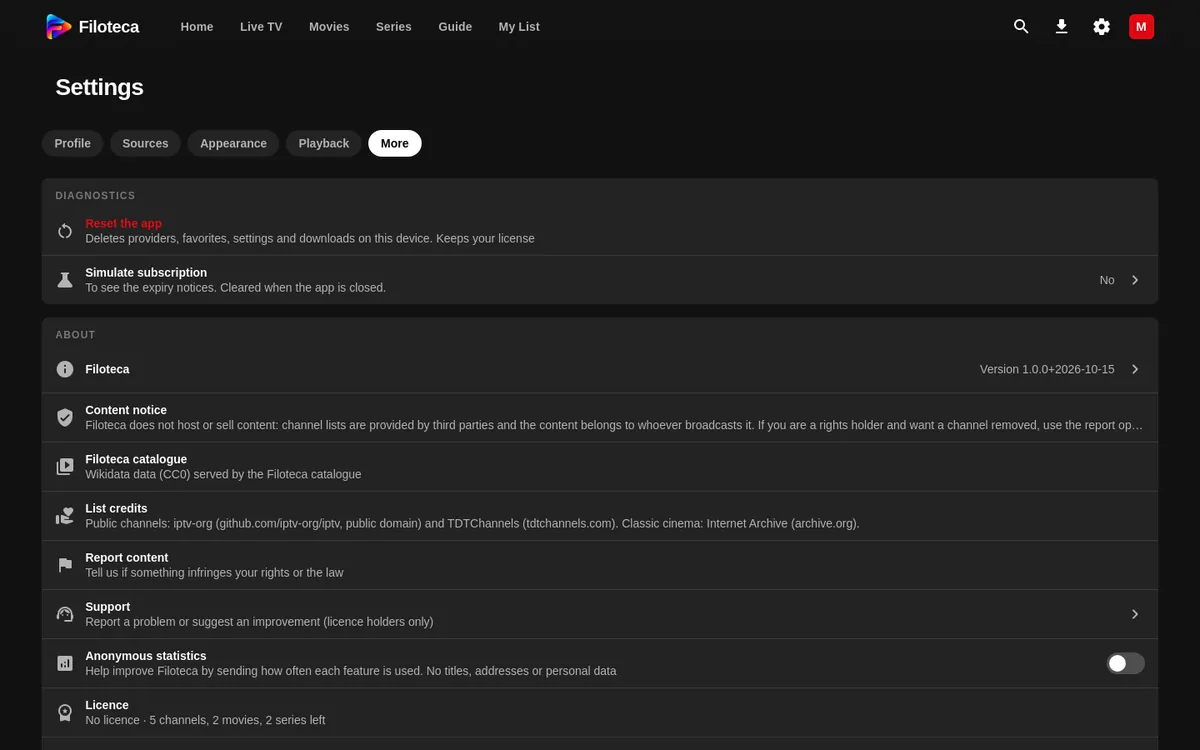
What is in “About”
- The app Version and “Platform”.
- “Licence”: status, key, “Free this device” (the beta and the licence). With a licence, “My account” also appears.
- “Check for updates” and “Notify about new versions” (checks once a day; it only queries the version). On Android, “Sound when a new version is available”.
- “What’s new”: what each version brings.
- “Content notice”, credits (“List credits”: iptv-org, Internet Archive; OMDb; TMDB).
- “Data and privacy” (guide).
Support
Settings → More → About → “Support”:
- Press “New ticket”.
- Choose the Type: “Problem”, “Idea” or “Opinion” (an opinion asks for a rating of 1 to 5 stars).
- Write the Subject and the Description (at least 10 characters: what is happening, on which screen, what you expected).
- Leave “Include technical data” ticked if you like: it attaches the app version, the platform, the screen size, the language and the state of the native player. It includes nothing personal.
You see your tickets as “Open”, “Answered” or “Closed”. The reply arrives in the app and by email. There is a daily and monthly limit on tickets (the screen shows “Left today…”).
During the beta you can also use “Beta feedback” (the bug icon): it opens the same form.
Reporting content
If something infringes your rights or the law: Settings → More → About → “Report content”, or the “Report” button in the player's info (key I).
- State “Which content” (title, channel, list or address).
- Choose the reason: Copyright, Illegal content, Inappropriate content, Broken or wrong, or Other.
- Write a description (at least 20 characters) and your email so we can reply.
- For copyright, we also ask for your capacity (rights holder, representative or other), the rights holder, a good-faith declaration and your signature.
When you send it you will see “Report sent” with a reference, and you will receive an acknowledgement by email. More information in the terms of use.