
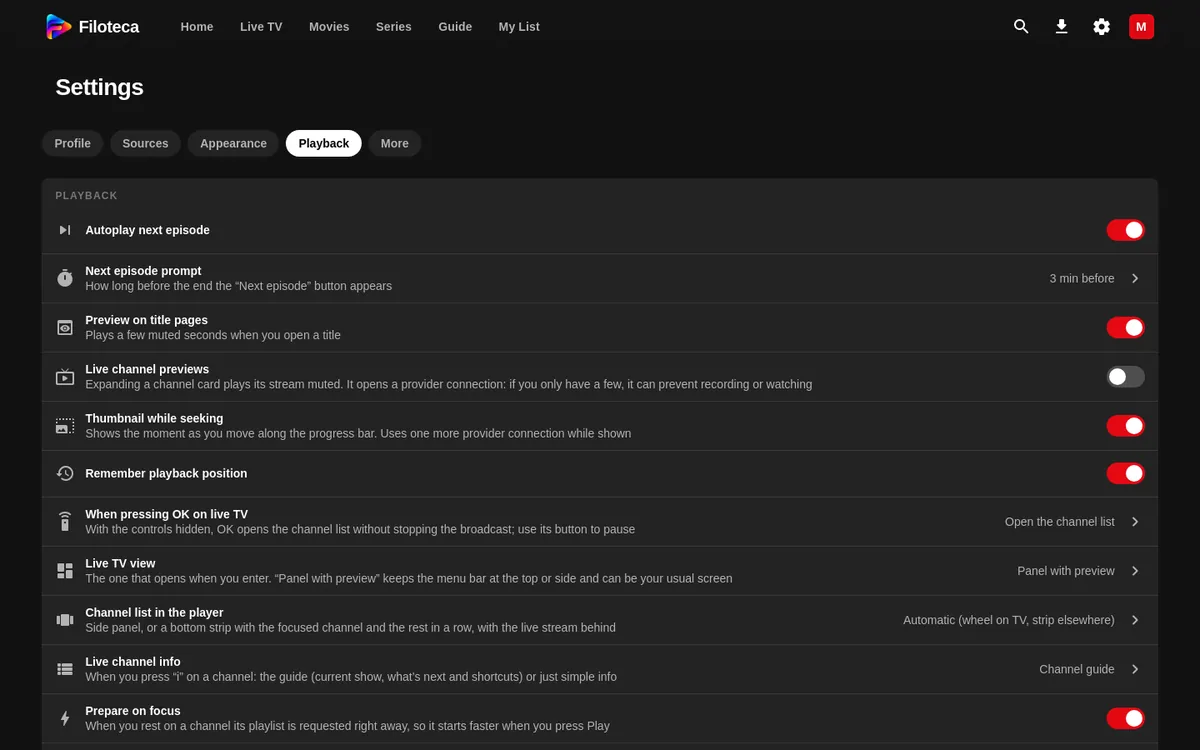
Settings → Playback brings together how videos are played.
Series and resuming
- “Autoplay next episode”: on by default.
- “Next episode prompt”: “Only at the end” or from 1 to 5 minutes before (3 by default).
- “Remember playback position”: on.
Previews
- “Preview on title pages”: a silent trailer when you open a detail page.
- “Live channel previews”: off by default; it uses up a connection from your provider.
- “Thumbnail while seeking” (not on TV): you see the picture as you drag the bar.
- “Prepare on focus”.
Live TV
- “Live TV view”: by category, grid, mosaic, list, panel with preview or zapping with list.
- “Preview in the Guide”: shows the focused channel and its programme card above the grid (off by default: the Guide is the full-screen grid).
- “Fast zapping” (Android): live channels start with less video buffered ahead, so you switch channels sooner. On a weak network it may stutter at the start; turn it off if so.
- “Channel list in the player” and “Live channel info”: choose the style.
- “When pressing OK on live TV”: “Pause” (default: OK pauses and resumes, as with films and series) or “Open the channel list” without stopping the broadcast.
- “Player controls”: how many buttons the player shows. “Automatic” (default) uses clean controls on TV and full controls on phone and desktop; also “Clean”, “Balanced”, “Minimal” or “Full”. Whatever is hidden is still in the “More options” menu (the ⋯ button at the top right).
- “Live TV quality”: “Automatic (by connection)”, “Always the best” or “Data saver”.
- “Live channel format”: HLS (m3u8) or MPEG-TS (ts). If a channel does not start, changing this often fixes it.
- “Pause and rewind live TV” (Android and Windows only; off), with “Minutes kept” (5, 15, 30 or 60).
Engine and audio
- “Native Android player” (phone and TV): supports more formats and Dolby/DTS audio. If it fails, the app uses the browser's player.
- “Beta player: instant start” (in testing).
- “Dolby/DTS audio”: only where conversion is available (Windows).
Subtitles
“Automatic subtitles” and “Subtitle language” appear when there is an OpenSubtitles key (Data and privacy).