
Filoteca is in beta. During the beta you can request a Premium licence at no cost: no card is required, nothing is charged and it does not renew by itself.
How to get the beta licence
- Go to filoteca.com/try and enter your email address.
- You will receive a 6-digit code; enter it on the same page (it expires after 15 minutes). If the beta is open by invitation only, you will also be asked for an invitation code in the format
BETA-XXXX-XXXX. - A licence key in the format
FILO-XXXX-XXXX-XXXXwill arrive by email. - Activate it in the app (see below).
Main conditions of the trial (the full text is in the terms of use, section 5.4):
- There is one trial per person and per device. Disposable email addresses are not accepted.
- The key works on 2 devices.
- The duration is the one shown when you request it. The days start counting when you activate the key, not when you receive it.
- You have 14 days from receiving it to activate it; otherwise it expires without having started.
- We email you 7 days and 1 day before it ends, and when it ends.
Where to enter the key
Any of these places will do:
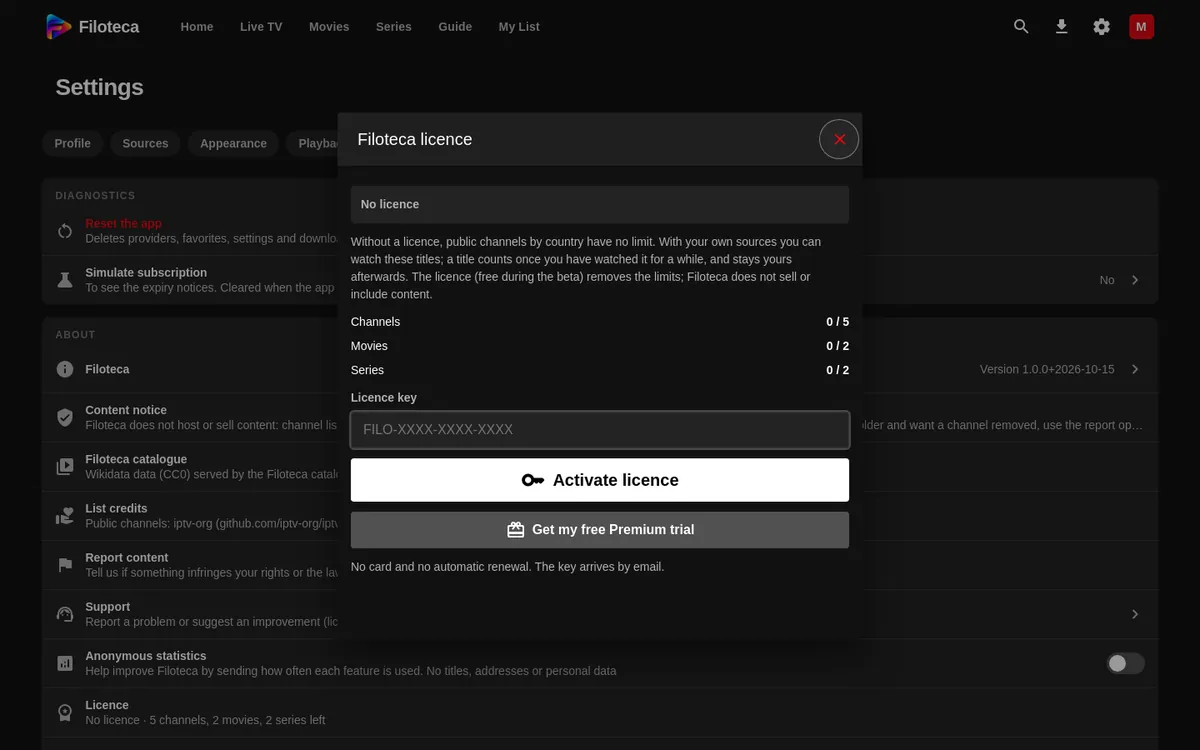
- Settings → More → About → Licence: type the key in “Licence key” and press “Activate licence”. If typing with the remote is awkward, use the button to enter the key from your phone.
- On the last screen of the welcome tour, the first time you open the app.
- With the “Activate licence” button on the home screen, while you have no sources yet.
If the key is correct, the app replies “Licence activated. Thank you!”.
If activation fails
| Message | What to do |
|---|---|
| “The key must look like FILO-XXXX-XXXX-XXXX.” | Check that you copied the whole key, with no spaces. |
| “That key does not exist. Check it.” | Check for look-alike characters (0/O, 1/I). |
| “That licence has expired.” / “That licence is no longer valid.” | The beta period for that key has ended. |
| “That key is already on 2 devices…” | On another device, open Settings → More → About → Licence and press “Free this device”. |
| “This device has already used a free Premium trial.” | There is one trial per device. |
| “Could not reach the licence server. Check your connection.” | Check your internet connection and try again. |
What changes with and without a licence
Without an active licence (before you request one, or once the beta ends) the app keeps working, with limits:
- The public lists by country, digital terrestrial TV, radio and “Classic cinema” have no limit.
- With your own sources you can watch up to 5 different channels, 2 movies and 2 series. A title counts once you have genuinely played it for about 20 seconds; browsing the catalogue, searching and switching channels do not use up your allowance.
- A “No licence” badge appears in the player, and a notice on Home shows what you have left.
With a Premium licence those limits disappear and extra features are unlocked: Filoteca Connect (your phone as a remote), sync between your devices, up to 5 viewer profiles (2 without a licence), and interface styles and colours. Those features appear dimmed with a PRO or PREMIUM label when you do not have a licence.
The licence is tied to the device and renews itself every few days; if the device stays offline for a long time, the app asks you to connect once.